Posts

Tracking my statistics in Heart of the Swarm

The new StarCraft II: Heart of the Swarm is really fun to play. According to sc2ranks.com , I am currently ranked #4862 in North America and #12192 on Earth. I hope to get promoted in the Gold league before the season ends. The 2013 Season 2 ends on 2013-05-01. I am currently #8 in my division -- which is Division Hierarch Delta.

Cost of hosting Ray Cloud Browser during 1 month in AWS EC2

Image
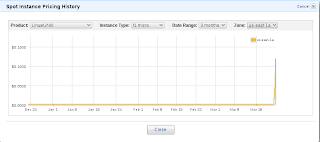
I got this question on Twitter: what has your bill totaled since you've started hosting ray viewer? I guess ray viewer is just another name for Ray Cloud Browser ;-P. For one month, I expect the costs to be at least 2.1915 $ (365.25/12*24*0.003) for my t1.micro spot instance and 6.4000 $ (64 * 0.10) for my 64 GiB Amazon EBS Standard volume . I/O requests are hard to predict, and I did run some I/O intensive workloads that were unrelated to Ray Cloud Browser during this period on my t1.micro instance. My resources are located in the availability zone us-east-1a. Here the pricing history for t1.micro spot instances in the us-east-1a availability zone. Figure 1: Pricing history for t1.micro spot instances in the us-east-1a availability zone. Data are from Amazon Web Services API. The vertical axis is a by-the-hour price. Using the Cost Allocation Feature, I generated ( with a home-baked Ruby script ) a pivot table for my operation costs in the cloud during the month...

Introducing genome subway maps

Image
It's no secret, data visualization is more appealing than bare tables with floating numbers and integers. And visualization can be dynamic and responsive too, if designed correctly. In November 2012, I started to work on a pet project called Ray Cloud Browser. From the name, you can tell that it's something to browse stuff related to astronomy: rays and clouds. In fact, that's untrue. Ray Cloud Browser is a data browser that can run in the cloud -- an abstraction for virtualized hardware that you pay by the hour. Ray is just the brand name of the products I am working on during my doctoral projects. Ray Cloud Browser is open source and free software. It's all on github with nice documentation and all that. Anyway, enough with the chitchat. The first picture I want to share is this view that illustrates repeated regions in a genome. It's very like a subway map, hence the title of this post. You can visit this subway location by yourself here . The dem...

Building a client for visualizing graphs, in a browser

A graph has a set of vertices and a set of edges. An edge is a relationship between two vertices. If you take Facebook, the vertices are people and the edges are friendships. If you take two people on Facebook, they are probably connected by just a few links -- like in pretty much every discrete systems known to mankind. A path (like that path between two people) is the second class of interesting objects for visualizing a given system, the first class being the graphs. With graphs and paths, it is possible to describe numerous discrete systems. In Ray Cloud Browser -- a graph visualizer for genomics, vocabulary terms were carefully selected. In Ray Cloud Browser, the 4 main object types are maps, sections, regions, and locations. A map is a graph in genomics. The vertices of a map are DNA sequences (like GATTACA), and edges are direct neighbourhood relationships (such as G ATTACA -> ATTACA G). A section is really just a bunch of paths in the graph. The paths in the map are ...
Using Cost Allocation Report on Amazon Web Services (AWS)

AWS offers web services like compute instances. Lately, I have been using one cc2.8xlarge instance for 3 hours on a weekly basis to give training sessions. My 14 students connect to orion.cloud.raytrek.com (a canonical name to my AWS instance) during every training session.The instance has one additional 300 GiB EBS volume attached to it so that my students keep their data for the whole duration of the training program. On AWS, I can tag anything I use: EC2 instances, EC2 EBS volumes, S3 buckets, and so on. A tag is a key and a value (key=value), for example Project=Ray-Cloud-Browser-public-demo . On AWS, it's possible to activate a feature called Cost Allocation Report. This feature deposits detailed usage reports in one S3 bucket that I own. These reports include costs. I tagged my Cost Allocation Report S3 bucket with Project=Billing to get a grasp on on much it costs to use the Cost Allocation Report feature. The cost of getting my Cost Allocation Report reports is only $...

Big milestone reached for Ray Cloud Browser

It's almost March, and yet another milestone for Ray Cloud Browser was successfully reached this week. The data model of this software is composited of 4 types of objects: a map (a DNA kmer graph with a name), a section (a group of DNA sequences which are called regions), a region (a DNA sequence), and a location (a position in a region). Ray Cloud Browser is a distributed application: some parts run in your browser, and some other parts run in the cloud (or your other favorite place to host your infrastructure). The client is in Javascript and HTML5 and runs in a web browser. The web service is in C++ and runs atop a web server. The web services is implemented in C++ and is really efficient. There are 3 file binary file formats (with ASCII version that can be converted). The first is the map, which contains all the k-mers of a sample, their coverage, their parents and their children. Any k-mer can obtained in a logarithmic time using the C++ API of this file format. The second...

Using canonical names for cloud instances

I am using these public cloud services: Product Service Provider Amazon Elastic Compute Cloud (EC2) Amazon Web Services, Inc. (AWS) Windows Azure Linux Virtual Machines Microsoft Corporation Rackspace Cloud Servers Rackspace, U.S. Inc. IBM SmartCloud® IBM Corporation My canonical names: Name Type Value browser.cloud.raytrek.com. CNAME ec2-23-23-55-35.compute-1.amazonaws.com. thor.cloud.raytrek.com. CNAME 108-166-117-29.static.cloud-ips.com. smart.cloud.raytrek.com. CNAME vhost0147.dc1.on.ca.compute.ihost.com. azure.cloud.raytrek.com. CNAME ray-tech.cloudapp.net. plp.cloud.raytrek.com. CNAME ec2-54-235-237-179.compute-1.amazonaws.com. orion.cloud.raytrek.com. CNAME ec2-54-242-199-219.compute-1.amazonaws.com.